

Why Technical SEO Is the Real Foundation of Rankings
I remember building my first website and spending weeks writing content. I thought good writing was enough. My pages sat at position 47 on Google for months. Nothing moved. Then a mentor told me to check the backend of my site. What I found shocked me. Google could barely crawl half my pages. That was my first lesson in technical SEO.
Technical SEO is the process of making sure search engines can find, read, and understand your website properly. No matter how great your content is, poor technical health will quietly kill your rankings. This guide covers 8 proven areas that make the biggest difference — explained simply so anyone can act on them today.

Table of Contents
Technical SEO Core Areas You Must Fix First
This is the heart of the guide. These 6 areas cover the most common problems that hold websites back from ranking. Fix these, and you give Google every reason to trust your site.
Site Speed and Core Web Vitals
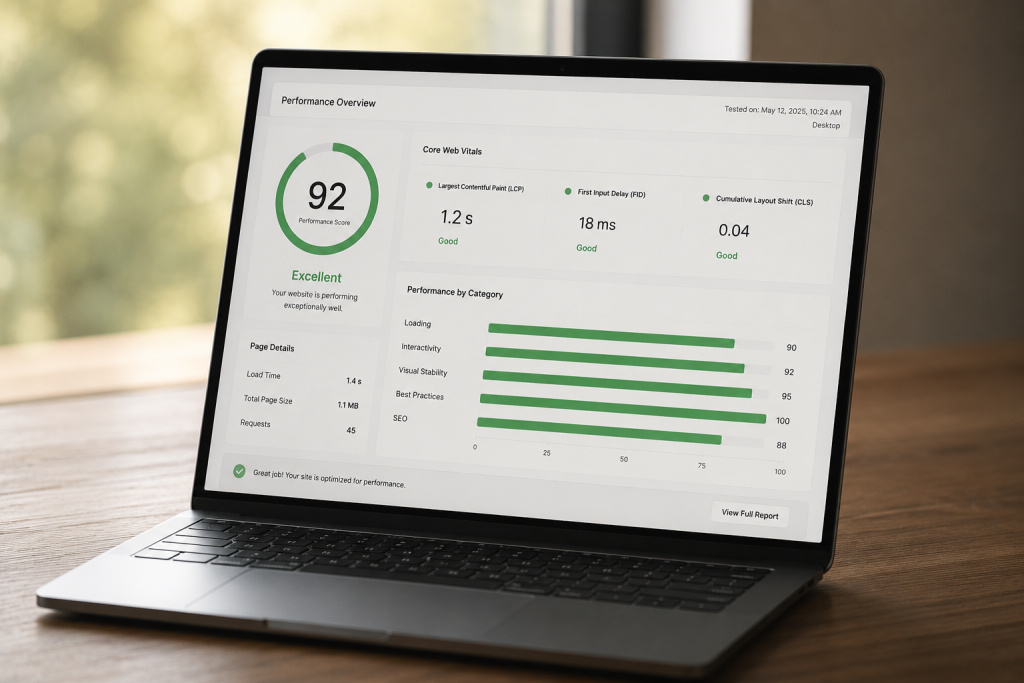
Site speed is one of the most direct ranking signals Google uses today. Slow websites frustrate users, and Google knows it. In 2021, Google officially made Core Web Vitals a ranking factor. These are three specific speed metrics:
- LCP (Largest Contentful Paint): How fast your main content loads. Aim for under 2.5 seconds.
- FID (First Input Delay): How quickly your page responds to a click. Keep it under 100ms.
- CLS (Cumulative Layout Shift): How stable your page looks while loading. Score below 0.1.
You can check all three using Google PageSpeed Insights. Fix lazy-loading images, reduce unused JavaScript, and use a fast hosting provider. These changes alone can lift your rankings noticeably.
Crawlability and XML Sitemap
If Google can’t crawl your pages, it can’t rank them. Crawlability means how easily Googlebot (Google’s crawler) can move through your site and discover all your pages.
Your XML sitemap is the map you give to Google. It lists every important page on your site. Without it, Google might miss key content entirely. Here is how to set it up:
- Install a plugin like Rank Math or Yoast SEO on WordPress.
- Both automatically generate your XML sitemap.
- Go to Google Search Console and submit your sitemap URL (usually yoursite.com/sitemap.xml).
- Check for any crawl errors under Coverage reports.
Also check your robots.txt file. A simple typo there can accidentally block Google from your entire site.
HTTPS and Site Security
Google confirmed HTTPS as a ranking signal back in 2014. Yet many websites still run on plain HTTP. If your site URL starts with http:// instead of https://, you are losing trust signals with both Google and your visitors.
Getting an SSL certificate is simpler than ever. Most hosting providers (like SiteGround, Hostinger, or Bluehost) offer free SSL through Let’s Encrypt. Once installed, make sure all your pages redirect from HTTP to HTTPS. Mixed content errors — where some page elements still load over HTTP — can silently hurt you too.
Mobile Friendliness
Google now uses mobile-first indexing. That means it looks at the mobile version of your site first when deciding where to rank it. If your site looks great on desktop but breaks on a phone, your rankings will suffer.
Test your site using Google’s Mobile-Friendly Test tool. Look for:
- Text that is too small to read on a phone screen
- Buttons that are too close together to tap easily
- Content that spills outside the screen width
- Images that don’t resize properly on small screens
A responsive WordPress theme solves most of these issues automatically.
Fixing Duplicate Content with Canonical Tags
Duplicate content confuses Google. When two URLs show the same or very similar content, Google does not know which one to rank. It might split ranking power between them — or ignore both entirely.
Canonical tags solve this problem. A canonical tag is a small piece of HTML code that tells Google which version of a page is the “main” one. For example:
<link rel="canonical" href="https://yoursite.com/page-name/" />
This signals Google to credit that URL with all the ranking value. Rank Math and Yoast both handle canonical tags automatically for most cases. Review them manually for category pages, tag pages, and paginated content.
Structured Data and Schema Markup
Structured data (also called schema markup) is code you add to your site that helps Google understand what your content is about. It doesn’t directly boost rankings but it can unlock rich results in Google search — like star ratings, FAQ dropdowns, and recipe cards.
These rich results increase your click-through rate dramatically, which indirectly helps rankings. Common schema types for bloggers include:
- Article schema
- FAQ schema
- How-To schema
- Review schema
Use Google’s Rich Results Test tool to check if your schema is working correctly.
How Technical SEO Affects Your Google Rankings
Technical SEO does not work alone. It works together with your content and your backlinks. Think of it like a three-legged stool. All three need to be solid. But technical SEO is the leg that most beginners ignore.
Here is a simple way to think about it. Imagine writing a perfect letter but putting it in an envelope with the wrong address. It never reaches anyone. Technical SEO is getting the address right. It makes sure your content actually reaches Google and gets delivered to searchers.
Google Search Console is the best free tool to track your technical health. It shows you which pages are indexed, which have errors, and what Core Web Vitals scores look like for real users on your site.
Technical SEO Tools That Actually Make a Difference
You don’t need to spend money to get started with technical SEO. Here are the most useful tools:
- Google Search Console (free): Crawl errors, index coverage, Core Web Vitals, manual actions
- Google PageSpeed Insights (free): Site speed and Core Web Vitals scores
- Screaming Frog SEO Spider (free up to 500 pages): Full crawl of your site, broken links, redirect chains
- Ahrefs Webmaster Tools (free): Backlink health, broken pages, crawl issues
- Rank Math (WordPress plugin): XML sitemap, canonical tags, schema markup — all in one place
Comparison Table: Common Technical SEO Issues vs Their Impact
| Issue | How It Hurts You | Difficulty to Fix | Priority Level |
|---|---|---|---|
| Slow site speed | Hurts Core Web Vitals rankings | Medium | High |
| Missing XML sitemap | Pages not indexed by Google | Easy | High |
| HTTP (no HTTPS) | Trust signals lost, minor ranking drop | Easy | High |
| Not mobile friendly | Google ranks mobile version first | Medium | High |
| Duplicate content | Split ranking signals, possible penalty | Medium | Medium |
| Missing schema markup | Fewer rich results in search | Easy | Medium |
| Broken internal links | Crawl budget wasted, bad user experience | Easy | Medium |
| Slow server response | Slows all pages site-wide | Hard | High |

Pros and Cons of Doing Technical SEO Yourself
Pros of Doing Technical SEO Yourself
- Saves money — You avoid expensive agency fees, especially if you’re just starting out
- Full control — You understand exactly what changes have been made on your site
- Learning value — Understanding technical SEO makes you a stronger, more independent creator
- Faster decisions — No waiting on an agency to fix something urgent like a crawl block
- Free tools exist — Google Search Console, PageSpeed Insights, and Screaming Frog handle most needs without cost
Cons of Doing Technical SEO Yourself
- Learning curve is real — Topics like crawl budget, hreflang tags, and server logs take time to master
- Mistakes can hurt rankings — A bad robots.txt edit or wrong canonical tag can block indexing
- Time consuming — Running a full audit, fixing issues, and monitoring results takes consistent effort
- Advanced issues need developers — Problems like slow server response times or JavaScript rendering issues often need technical help
- Easy to miss things — Without a trained eye, critical errors can stay hidden for months
How to Start Your Technical SEO Journey Today
Ready to take action? Here is a simple, practical starting point anyone can follow:
- Set up Google Search Console today if you haven’t yet — it’s free and takes 10 minutes
- Submit your XML sitemap through Search Console right away
- Run a speed test on Google PageSpeed Insights and note your lowest-scoring pages
- Install Rank Math (or Yoast) if you use WordPress — it handles sitemap, canonicals, and schema automatically
- Fix any HTTPS mixed content warnings using your hosting panel or a plugin like Really Simple SSL
- Check your site on a real phone — not just a desktop browser — and look for layout or usability issues
- Use Screaming Frog (free up to 500 pages) to find broken links and redirect chains
For a full beginner’s breakdown of SEO and digital growth strategies, visit growwithmridul.in — Mridul has put together genuinely useful guides for creators and website owners starting from scratch.

What Really Matters in Technical SEO
Here’s what you actually need to remember from everything above. Technical SEO is not about doing hundreds of things perfectly. It’s about fixing the most important things first and building good habits over time.
The 6 core areas covered in this guide are:
- Site speed and Core Web Vitals — make your site fast for both users and Google
- Crawlability and XML sitemap — help Google find every page you want ranked
- HTTPS security — give Google and visitors a reason to trust your site
- Mobile friendliness — optimise for how most people actually browse the web
- Canonical tags — stop duplicate content from silently splitting your ranking power
- Structured data — help Google understand your content and show rich results
Start with Google Search Console and fix one issue at a time. You don’t need to master everything in a week. Consistent, small improvements compound over months into real ranking gains.
Your website deserves to be found. Now go make sure Google can actually find it.
Frequently Asked Questions About Technical SEO
What is technical SEO and why does it matter?
Technical SEO refers to the behind-the-scenes optimisations that help search engines crawl, index, and understand your website. It matters because even the best content will not rank if Google cannot access or read it properly. Think of it as the foundation your entire SEO strategy is built on.
How do I check my site’s technical SEO health?
The best free starting point is Google Search Console. It shows crawl errors, indexing issues, and Core Web Vitals data for your actual visitors. Pair it with Google PageSpeed Insights for speed scores and Screaming Frog for a full site crawl. Together, these three tools give you a solid picture of your site’s technical health.
What is a good Core Web Vitals score?
Google considers these scores “good”: LCP under 2.5 seconds, FID (or INP) under 200ms, and CLS below 0.1. You can check your scores in Google Search Console under the Core Web Vitals report, or test any individual page with Google PageSpeed Insights. Scores in the “needs improvement” or “poor” range are worth prioritising.
How often should I do a technical SEO audit?
Run a full technical SEO audit at least once every three months. If you publish content frequently or make site changes often, check Google Search Console every two to four weeks for new crawl errors or drops in indexed pages. Major site updates like theme changes or plugin installations should always be followed by a quick audit.
Is technical SEO different from on-page SEO?
Yes, they’re different but connected. On-page SEO covers things you can see — your headings, keywords, content quality, and meta descriptions. Technical SEO covers the things underneath — site speed, crawlability, HTTPS, XML sitemaps, and structured data. Both matter for rankings, and both should be part of your overall SEO strategy.